ProfitMaps AI Features
Explore the AI-Powered Tools for Google Maps Rankings, Local SEO, Websites & Business Growth
What if you could check how a local business appears across Google Maps, identify competing businesses, generate an improvement plan, and create a professional website without switching between several different platforms?
That’s the idea behind ProfitMaps AI.
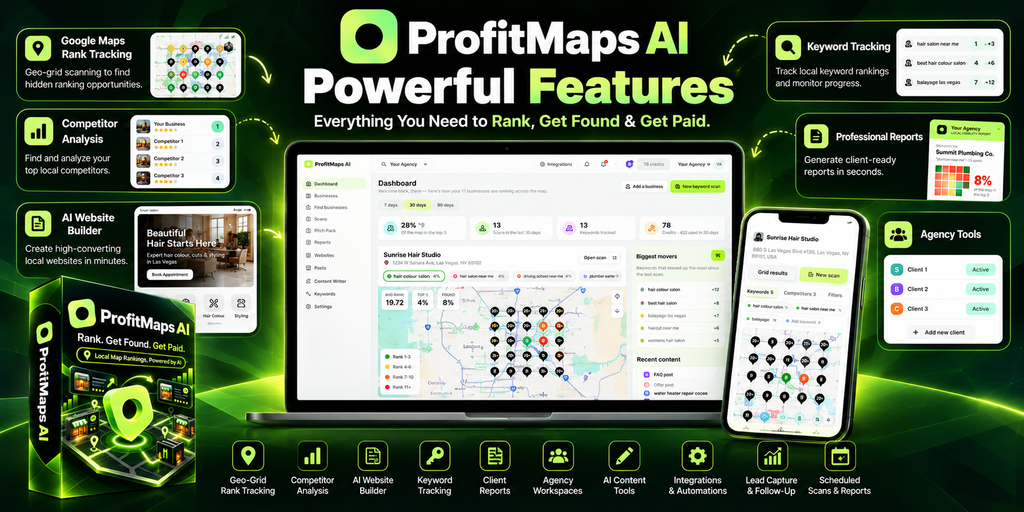
The software brings together geographic rank tracking, competitor research, AI-generated recommendations, website creation, content writing, lead capture, and client management tools.
But here’s what makes the platform interesting: these features aren’t simply separate tools sitting inside the same dashboard. They’re designed to support a connected workflow, from researching local businesses to preparing reports and marketing materials.
For freelancers and agencies, that could simplify tasks that usually involve several applications.
For beginners, the visual approach may make local SEO easier to understand.
However, some capabilities are included with the entry-level package, while others require higher-tier plans. Certain operations also consume usage credits.
In this guide, we’ll explore the main ProfitMaps AI features, explain how they work, and examine which tools may be useful for different types of users.
Discover the available packages and current software capabilities.
What Are the Main ProfitMaps AI Features?
ProfitMaps AI is an AI-powered local SEO platform that helps users analyze Google Maps rankings, research competitors, generate websites, create marketing content, and prepare reports for local businesses.
Its primary feature is geographic rank tracking.
Instead of checking a business’s search position from only one location, ProfitMaps AI analyzes rankings across several geographic points.
The resulting map helps reveal where a business performs well and where competing businesses appear more prominently.
But the platform extends beyond rank tracking.
Here’s an overview of its main capabilities.
| Feature | Main Purpose |
|---|---|
| Google Maps Geo-Grid Scanner | Analyze rankings across multiple geographic locations |
| Competitor Analysis | Identify competing businesses in local search results |
| AI Action Planner | Generate suggested steps from ranking data |
| Local SEO Reports | Present findings through PDFs and shareable links |
| AI Website Generator | Create websites for local businesses |
| Lead Capture | Collect enquiries from generated websites |
| AI Article Writer | Prepare locally relevant website content |
| Google Business Profile Post Writer | Draft posts for local business profiles |
| Keyword Finder | Research keywords associated with a website and location |
| Ranking History | Compare previous geographic ranking scans |
| Recurring Scans | Schedule scans to run again automatically |
| CSV Export | Export ranking points and competitor information |
| Business Finder | Discover potential business prospects |
| Agency Workspaces | Organize multiple client projects |
| White-Label Reporting | Customize reports with business branding |
| AI Assistant Connection | Connect compatible AI assistants through MCP |
Not every feature has the same availability or limits across all plans.
Let’s examine the tools in more detail.
1. Google Maps Geo-Grid Rank Tracker
The geo-grid rank tracker is the central feature of ProfitMaps AI.
To understand its value, you first need to understand how local search rankings behave.
Imagine a plumbing company in Dallas.
When the owner searches for “emergency plumber” from the office, the company might appear among the first few businesses in Google Maps.
That looks encouraging.
However, someone searching from another neighborhood may see a different set of results.
Why?
Local search rankings can vary based on the searcher’s location, the relevance of nearby businesses, competition, and other factors.
A single ranking check doesn’t always provide a complete picture.
How Geo-Grid Scanning Works
ProfitMaps AI examines search positions at multiple points across a selected geographic area.
The default 5×5 grid contains 25 positions.
Larger grids are available through qualifying packages and configurations.
Each point represents a separate geographic location used for checking the selected keyword.
The software then displays those results on a map.
Different colors help distinguish stronger rankings from weaker positions.
For example:
- Green indicates strong visibility.
- Intermediate colors represent lower positions.
- Red or an unavailable result indicates weak visibility or that the business wasn’t found within the tracked range.
The map provides a visual overview of how search performance changes across the area.
Why This Feature Matters
Here’s what most people don’t know: a business can rank well near its physical location and still have limited visibility across much of its service area.
A geo-grid scan makes those differences easier to investigate.
This is especially useful for businesses serving multiple neighborhoods, including dentists, plumbers, electricians, roofers, and HVAC contractors.
The information can help marketers identify areas that deserve further research.
However, a ranking scan records search results at a particular moment. It doesn’t guarantee that the same positions will appear tomorrow.
2. Local Competitor Analysis
Knowing where a business ranks is helpful.
Understanding which businesses appear ahead of it can be even more useful.
ProfitMaps AI includes competitor analysis that examines businesses appearing in the selected geographic search results.
For example, suppose you’re researching a roofing contractor in Houston.
Your scan shows that the business performs well near its office but has weaker visibility in surrounding neighborhoods.
Competitor analysis can help identify which other roofing companies appear more consistently across those locations.
What Can You Learn?
You can investigate:
- Which businesses appear prominently across the scanned area.
- Where the selected business performs relatively well.
- Which competitors appear in multiple geographic positions.
- Where additional competitive research may be useful.
The results can provide valuable context when preparing a local SEO audit.
However, a competitor appearing above another business doesn’t automatically reveal why that happened.
You may still need to examine business categories, relevance, reviews, website information, and other local search factors.
The software helps identify patterns. Professional judgment helps interpret them.
3. AI-Powered SEO Action Planner
A colorful map can show a ranking problem, but what should happen next?
That’s where the AI Action Planner comes in.
ProfitMaps AI uses scan information to generate a structured set of suggested improvements.
Instead of giving users raw numbers alone, it helps translate the findings into a more understandable action list.
For example, an action plan might encourage further investigation into business profile completeness, local service content, or visibility differences between neighborhoods.
Why It’s Useful
Many business owners aren’t familiar with technical SEO terminology.
They want to understand what the findings mean and what could be done about them.
A structured plan can make those conversations easier.
However, AI-generated recommendations should always be reviewed.
A scan may reveal weak visibility, but it doesn’t necessarily prove the underlying cause.
Treat the action planner as a research assistant rather than an automatic SEO expert.
4. Professional Local SEO Reports
Collecting ranking information is only part of the process.
Presenting it clearly is just as important.
ProfitMaps AI includes reporting functionality designed to help users communicate local search findings.
Reports can include geographic ranking information and supporting analysis.
The platform supports PDF reports and read-only shareable links, making it easier to send results without requiring the recipient to access the full dashboard.
A Practical Example
Imagine contacting a local dental clinic.
Instead of sending a message saying, “Your SEO needs improvement,” you prepare a geographic report.
The report shows where the clinic appears prominently in Google Maps and where visibility is weaker.
That provides a more concrete starting point for a conversation.
The business owner can see the geographic pattern rather than relying entirely on a technical explanation.
Branded Reports
Report branding depends on the available plan.
Basic supports reports with account identity details, while advanced white-label options can provide more control over branding and attribution.
This distinction matters when comparing packages.
A professionally presented report can improve communication, but its conclusions still need to be accurate.
5. AI Website Generator
Not every local business has a modern, useful website.
Some websites are outdated. Others make it difficult to find contact information or understand the services offered.
ProfitMaps AI includes an AI website generator that helps users prepare websites for local businesses.
The platform combines AI-assisted planning with website creation and editing functionality.
How Could You Use It?
Imagine researching an electrician who has a Google Business Profile but no useful website.
You could prepare a sample website concept showing how the business might present its services, location, and contact information.
That can make a marketing discussion more practical.
Instead of describing what a website could look like, you have something visual to demonstrate.
What About Website Editing?
The platform includes editing functionality so generated content can be reviewed and adjusted.
This is important because AI-generated websites shouldn’t be published without checking the details.
Business names, service descriptions, contact information, opening hours, and claims must accurately reflect the company.
Basic supports up to 10 generated websites, while higher packages provide expanded capacity.
6. Built-In Lead Capture
A website can look attractive and still fail to serve its most basic purpose: helping visitors contact the business.
ProfitMaps AI includes lead-capture functionality on generated websites.
Visitors can submit enquiries through forms, and those enquiries appear in the account’s lead inbox.
For local businesses, this provides a straightforward way to collect potential customer information.
For marketers, it connects website creation with an actual business workflow.
Why Lead Capture Matters
Suppose someone visits a local roofing company’s website after searching for roof repairs.
They want to request an estimate.
If there’s no clear contact option, they may leave and choose another business.
An accessible enquiry form can help make that next step easier.
However, collecting an enquiry doesn’t guarantee a sale.
The business still needs to respond, understand the customer’s requirements, and provide appropriate service.
7. AI Article Generator
Creating useful content for local business websites can take considerable time.
ProfitMaps AI includes an AI article generator that helps prepare initial drafts.
These articles can support service explanations and locally relevant topics.
For example, a plumbing company might want content explaining common causes of low water pressure or signs that a water heater needs professional attention.
AI can help create a starting draft.
What Makes This Feature Useful?
The primary benefit is reducing the effort required to begin writing.
Instead of starting with an empty page, users can review and improve an initial article.
But here’s an important point.
Search engines don’t reward content simply because it contains the right keywords.
The information needs to be useful, accurate, and relevant to the intended reader.
Generated articles should be edited to reflect the business’s actual services and expertise.
8. Google Business Profile Post Writer
Google Business Profile allows businesses to publish updates that may appear alongside their business information.
ProfitMaps AI includes a tool for drafting these posts.
Examples might include service announcements, seasonal updates, or useful information for customers.
For someone managing several business profiles, preparing drafts can become repetitive.
AI assistance may simplify that process.
However, posts should be checked before publication.
Avoid misleading promotional claims, incorrect business information, or content that doesn’t reflect the actual service.
The purpose should be to communicate useful information, not simply publish more frequently.
9. Keyword Finder
Choosing relevant search terms is an important part of local SEO.
ProfitMaps AI includes a Keyword Finder that allows users to enter a website and town to investigate keywords associated with its search visibility.
This can help marketers understand which terms may deserve further attention.
For example, a landscaping company may offer lawn maintenance, garden design, and seasonal cleanup services.
Different customers search for these services using different phrases.
Keyword research helps identify the language people use when looking for relevant businesses.
How Is This Different From Geo-Grid Scanning?
Keyword Finder helps users investigate search terms.
Geo-grid scanning examines how a selected business appears across geographic locations for a chosen term.
The two features support different parts of the research process.
One helps determine what to investigate. The other examines geographic visibility.
10. Ranking History and Recurring Scans
A single ranking report provides a snapshot.
But local search visibility changes over time.
ProfitMaps AI includes ranking history so users can compare scans conducted at different points.
This can help identify whether geographic visibility has improved, declined, or remained relatively stable.
Recurring Scan Automation
The software also supports scheduled recurring scans.
Instead of manually repeating every scan, users can configure supported scans to run again automatically.
Each recurring scan consumes the applicable credits.
This can be useful for agencies monitoring several clients.
However, interpreting changes requires care.
A ranking improvement doesn’t automatically prove that one particular optimization caused it.
Competitors, search conditions, and other factors may change during the same period.
Use historical data as evidence to investigate rather than absolute proof of cause and effect.
11. Business Finder for Local Client Prospecting
Business Finder is one of the platform’s more business-oriented features.
It’s designed to help users discover potential clients by selecting a business category and geographic area.
For example, you might research dentists in Las Vegas or plumbing companies in Phoenix.
The tool can help locate businesses and organize prospecting information.
Published functionality includes a scoring system from 0 to 99 and filters related to website availability and ranking visibility.
Why Is This Interesting?
Manual business research can be time-consuming.
You search for businesses, gather information, inspect their online presence, and decide whether they’re suitable prospects.
Business Finder can simplify part of that process.
However, the score should be treated as a research aid rather than a definitive measurement of business quality or sales potential.
A low score doesn’t guarantee that a company needs your services.
And finding a prospect doesn’t mean they’ll become a paying customer.
Business Finder is associated with higher-tier packages and optional upgrades.
12. Agency Workspaces and Client Access
As the number of client projects grows, organization becomes increasingly important.
ProfitMaps AI provides agency-oriented functionality through qualifying plans.
This includes client workspaces, client access, and team-related features.
Imagine managing local search research for several dental clinics, HVAC contractors, and roofing companies.
Without separate workspaces, reports and business information can become difficult to organize.
Client workspaces help keep projects separated.
Optional read-only client portals can also make it easier to share information without giving clients full administrative access.
These features are most useful for established freelancers and agencies handling multiple accounts.
Beginners working with one or two businesses may not need the additional capacity immediately.
13. CSV Export for Detailed Analysis
Not everyone wants to examine data only inside a dashboard.
Some marketers prefer spreadsheets for comparing information or maintaining client records.
ProfitMaps AI supports CSV exports containing scan points and competitor results.
This makes it possible to review information outside the application using compatible spreadsheet software.
For example, an agency could export scan data for further analysis or combine it with other internal reporting information.
The export feature provides flexibility without requiring users to depend entirely on dashboard views.
14. MCP Integration for Compatible AI Assistants
ProfitMaps AI also supports MCP connectivity.
MCP stands for Model Context Protocol.
In simple terms, it allows compatible AI assistants to connect with supported application functionality and account information.
This can be useful for users who already work with AI-assisted workflows.
However, connection availability, permissions, and supported operations depend on the platform and compatible assistant being used.
Users should review connection settings and data access carefully before enabling integrations.
ProfitMaps AI Features by Package
Not every account has identical capabilities.
Here’s a general comparison of the advertised packages.
| Feature | Basic | Gold | Platinum |
|---|---|---|---|
| Geo-Grid Scanner | Included | Included | Included |
| Competitor Analysis | Included | Included | Included |
| AI Action Planner | Included | Included | Included |
| Website Generator | 10 websites | Expanded capacity | No stated software cap |
| Lead Capture | Included | Included | Included |
| AI Content Tools | Included | Included | Included |
| Ranking History | Included | Included | Included |
| Recurring Scans | Included, uses credits | Included, uses credits | Included, uses credits |
| CSV Export | Included | Included | Included |
| Business Finder | Not included | Included | Included |
| Agency Workspaces | Not included | Included | Expanded capacity |
| Advanced White-Label Reporting | Not included | Included | Included |
| Usage Credits | Required for certain operations | Required for certain operations | Required for certain operations |
Exact account limits and feature entitlements should be confirmed against the current purchase details.
For updated costs, visit our ProfitMaps AI Pricing Guide or compare packages on our Bundle Comparison page.
How the Features Work Together
Individual features are useful, but the connected workflow is what makes the platform worth examining.
Consider a hypothetical local marketing project.
You begin by researching roofing businesses in a particular city.
Using Business Finder, you identify companies worth investigating.
Next, you run geographic ranking scans for relevant search terms.
You examine the results and review competing businesses.
The AI planner suggests areas for further investigation.
Then you prepare a report showing the ranking patterns and potential opportunities.
If the business has an outdated website, you might create a sample website concept using the AI website generator.
Finally, you share the relevant findings and discuss whether the business wants additional help.
This workflow brings research, presentation, and marketing preparation into one process.
But it still requires human involvement at every important decision.
The software doesn’t automatically qualify prospects, close deals, or deliver guaranteed search ranking improvements.
Advantages and Limitations of ProfitMaps AI Features
Before purchasing, it’s worth considering both sides.
Advantages
- Combines multiple local marketing tools in one platform.
- Makes geographic ranking information easier to visualize.
- Helps prepare reports for client communication.
- Supports website and content creation.
- Includes tools for local business research and prospecting.
- Offers workflow features for agencies and teams.
- Provides historical scans and export options.
Limitations
- Certain operations consume usage credits.
- Advanced features require qualifying plans.
- AI-generated content and recommendations need review.
- Google Maps rankings can change over time.
- Ranking reports don’t guarantee improved visibility.
- Business prospecting doesn’t guarantee paying clients.
- Larger grids and external integrations may involve additional requirements.
The biggest mistake people make is expecting software to replace the skills needed to interpret information.
ProfitMaps AI can simplify several activities, but it’s most useful when combined with thoughtful research and realistic marketing decisions.
Frequently Asked Questions About ProfitMaps AI Features
What is the main feature of ProfitMaps AI?
Its primary feature is Google Maps geo-grid rank tracking, which checks local search rankings across multiple geographic positions.
Does ProfitMaps AI include competitor analysis?
Yes. It helps users identify businesses appearing in local search results and investigate geographic ranking differences.
Can ProfitMaps AI create websites?
Yes. The platform includes an AI website generator with editing and lead-capture functionality.
Does ProfitMaps AI include AI content writing?
Yes. It includes tools for drafting website articles and Google Business Profile posts.
Can ProfitMaps AI find potential clients?
Business Finder supports local business prospecting through qualifying higher-tier packages.
Does ProfitMaps AI support automated ranking scans?
Yes. Recurring scans can be scheduled, although each scan consumes the applicable usage credits.
Are all features included in Basic?
No. Basic includes the core scanning, competitor analysis, website, content, and reporting features. Advanced prospecting and agency features are associated with higher-tier packages.
Can ProfitMaps AI guarantee better Google Maps rankings?
No. The software helps analyze visibility and prepare recommendations, but actual ranking improvements depend on many factors.
Final Thoughts: Are ProfitMaps AI Features Useful?
ProfitMaps AI combines geographic ranking analysis with tools for preparing reports, creating websites, drafting content, researching businesses, and organizing client work.
Its strongest feature is the Google Maps geo-grid scanner.
That visual approach makes local visibility easier to understand than relying on a single ranking position.
The additional tools become more interesting when used together.
A marketer can research a business, examine its geographic rankings, review competitors, create an action plan, and prepare materials for a client conversation.
That connected process may reduce the need to switch between several applications.
However, not every feature will be necessary for every user.
Beginners may find the core scanning and reporting tools sufficient, while agencies may benefit more from prospecting, client workspaces, and expanded capacity.
Before choosing a package, consider how frequently you’ll use the tools and whether additional credits or external services will be required.
ProfitMaps AI is best viewed as a local marketing research and workflow platform—not a system that automatically guarantees rankings, leads, or income.
Ready to Explore ProfitMaps AI?
Discover the available features, compare the software packages, and choose the tools that fit your local marketing needs.
Review the latest pricing, plan limits, credit usage, and purchase conditions before ordering.